
Serverless concurrency limits: when Lambda says “Rate Exceeded”
Serverless platforms cap how many invocations run at the same time — AWS Lambda’s default account limit is 1,000. Invocations beyond the cap are throttled, not queued.
What causes it
Concurrency is arrival rate multiplied by how long each invocation takes. Slow downstream calls (a database, an external API) make every invocation longer and so multiply the concurrency you need. A function calling a 2-second API at 600 requests per second needs 1,200 concurrent instances.
How to recognise it
- TooManyRequestsException / Rate Exceeded
- Concurrent executions flat at the limit
- Errors rise when a downstream dependency slows down
The math
Concurrency needed = arrival rate × invocation duration
Error messages you will see
| Error | Seen in |
|---|---|
429 Too Many Requests | Users, Router, Server, Database, Cache, Queue and 214 more |
TooManyRequestsException: Rate Exceeded | AWS Lambda |
How to fix it
- Raise the concurrency limit
- Make each invocation faster (including downstream calls)
- Put a queue in front to absorb bursts
Reproduce it in the simulator
These templates trigger this failure on purpose:
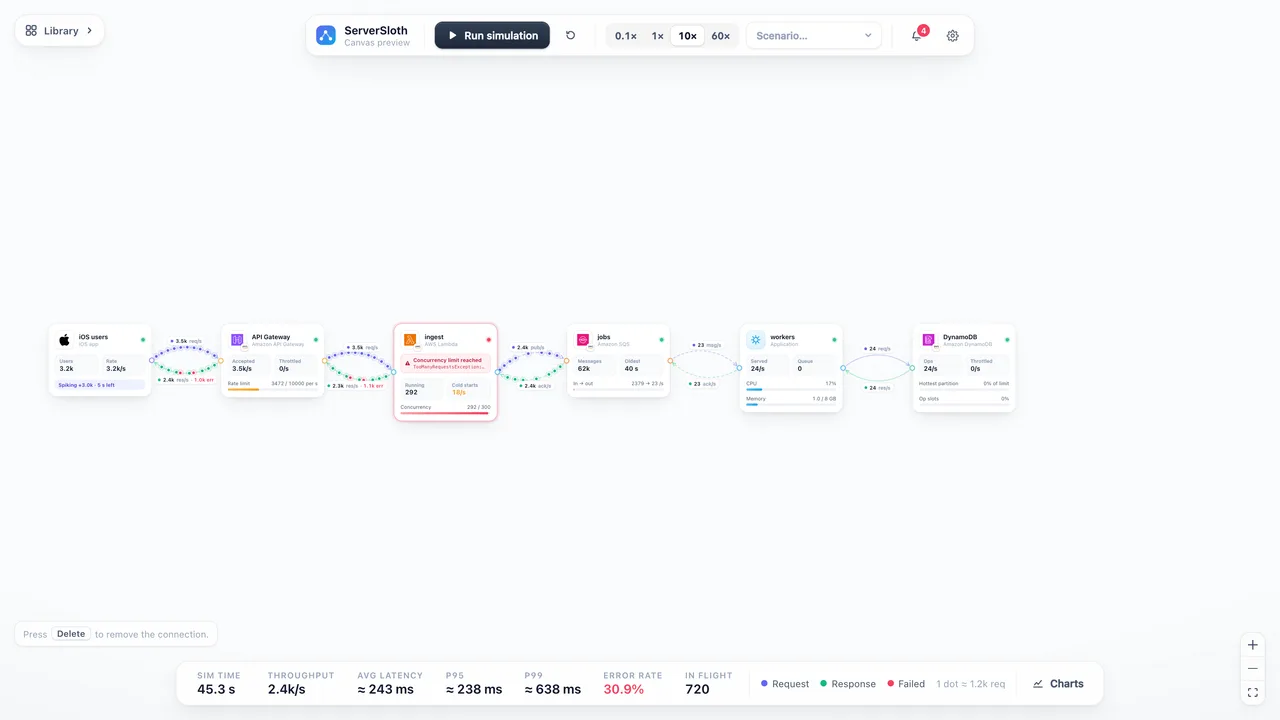 Scale-up
Async pipeline
API Gateway → Lambda → SQS → workers → DynamoDB. A traffic spike hits at 20 s.
Learn more
Part of the guide Load balancing and capacity planning.